
Syncify 2#
Many moons have passed since I last touched Syncify. Finally, with a little more time on my hands (this blog post was due in January, oops) and some help from a couple of friends, we’ve got a new version out!
Syncify will now sync your liked songs in the background for you! 🎉🎉🎉
The tech stack has also changed to Python (FastAPI) + React + AWS. Quite the difference to the old stack which was Golang + HTMX.
Python was my friends’ preferred language and was also helpful as a low-stress way to learn more about Python as a backend language, using Syncify as a testbed for all the things I did at DreamDesk AI.
New UI#
With the introduction of background jobs, we no longer need to force the user to sit on the page as the backend runs your job in one request. Instead, the frontend now just allows you to queue a sync job and then shows you the progress. It also now lists some of your past syncs.
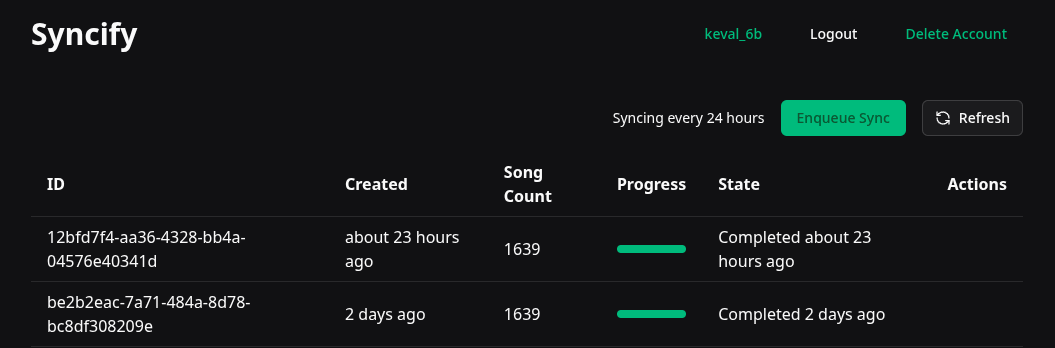
The old version was cleaner for sure, but it was really minimal. You didn’t even get a progress indicator. Even this version is quite rough around the edges, I probably need to remove the sync request ids and figure out a better layout for the info and buttons we’ve just lazily thrown at the top right.
In terms of API access, we’re now using TanStack Query. If you’ve not used it, you’re not doing frontend right. It’s one of the best abstractions I’ve ever seen. It essentially worries about a load of state management around a fetch query that you’d otherwise have to duplicate for every endpoint you have. Need to show something specific if the query errored out? {query.error && <div>Something went wrong</div>}. Need the query to refetch automatically? { ..., refetchInterval: 5000, }. That’s just scratching the surface too. It’s lovely.
All that said, there’s one thing I don’t like about the way we currently show progress updates (this isn’t a fault of TanStack Query just to be clear). When showing progress updates, we’re using that re-fetch interval to poll the backend for the current status of the sync request. This isn’t particularly efficient, and I’d much rather have the backend push updates to the frontend using something like Server Sent Events (SSE). This would add complexity, and we wouldn’t be able to use TanStack Query (boo), but ultimately the repeated re-fetch isn’t particularly scalable.
Right now, we refetch every 3 seconds if the initial jobs request contains any incomplete jobs. An SSE implementation instead, would open an SSE request to the backend which would subscribe to updates to a job’s progress. This would allow us to update the frontend in real-time as the job progresses without the need for repeated polling. There are still a few challenges with this, though, as we’ll discuss soon.
Job Queues & Idempotency#
With the new background syncing system came some interesting problems to solve, the biggest of which is scheduling the jobs. There were many ways I could have gone about implementing this, my first thought went to something like Celery, but I really didn’t want to add another dependency. For the first iteration, I decided on creating a Postgres table that could act as a queue.
The table ended up looking like this:
create table sync_requests
(
    id         serial
        primary key,
    user_id    varchar                                not null
        references users
            on delete cascade,
    song_count integer                                not null,
    progress   double precision                       not null,
    created    timestamp with time zone default now() not null,
    completed  timestamp with time zone
);

create index ix_sync_requests_user_id
    on sync_requests (user_id);

create index ix_sync_requests_completed
    on sync_requests (completed);

create index ix_sync_requests_created
    on sync_requests (created);
When a user requested a sync, or the scheduler ran and created a sync job on behalf of a user, it got placed in this table.
A worker then pulled off the queue using the following query:
select * from sync_requests where completed is null order by id asc limit 1;The completed column acted as the idempotency key, so that we weren’t running the same job twice. The one thing this system didn’t handle was the worker crashing mid-job. I’d accepted that tradeoff initially since there’s always another job for each user scheduled soon after, but it was a known rough edge.
AWS#
Recently I decided I wanted to move the service off of my home server and onto AWS. The poor little NUC under my stairs isn’t particularly brilliant for user-facing applications in terms of uptime and reliability. The move meant I could set up some Infrastructure as Code (IaC) and repeatably deploy Syncify into AWS and utilise more cloud native serverless services like Simple Queue Service (SQS) and DynamoDB and still pay next to zero.
So SQS and DynamoDB replaced the postgres instance we just discussed. We got better idempotency and error handling with dead letter queues with super simple alerts using CloudWatch and SNS. SQS now handles the job queue, and DynamoDB handles the job status, which is still polled from the frontend via the API.
Speaking of the API, it’s now one Lambda function behind a basic API Gateway. Super simple and it works really well. The worker for the background syncing is also a Lambda too, it pulls straight off the SQS queue and updates job statuses in DynamoDB.
Sync Job Progress Updates#
As we mentioned above, the frontend polls for job progress every few seconds, which burns a lot of Lambda requests and isn’t scalable. (AWS would happily do it with its infinite scale serverless infrastructure… might just cost a small fortune.) It looks like this right now:
sequenceDiagram
    participant FE as Frontend
    participant GW as API Gateway
    participant API as API Lambda
    participant DDB as DynamoDB
    participant SQS as SQS Queue
    participant W as Worker Lambda

    FE->>GW: POST /sync (queue job)
    GW->>API: invoke
    API->>DDB: put job (status=pending)
    API->>SQS: send message
    API-->>FE: 202 Accepted

    SQS->>W: deliver message
    activate W
    W->>DDB: update progress
    W->>DDB: update progress
    W->>DDB: status=complete
    deactivate W

    loop every 3s while job incomplete
        FE->>GW: GET /sync/{id}
        GW->>API: invoke
        API->>DDB: read job
        API-->>FE: job status + progress
    end
The SSE alternative I’m thinking of is to have the worker push events onto an EventBridge bus and then have a streaming Lambda subscribe to the bus. It might look something like this:
sequenceDiagram
    participant FE as Frontend
    participant URL as Function URL
    participant SSE as SSE Lambda
    participant EB as EventBridge
    participant W as Worker Lambda
    participant DDB as DynamoDB

    FE->>URL: GET /sync/{id}/stream
    URL->>SSE: invoke (response streaming)
    activate SSE
    SSE->>EB: subscribe to job {id}

    W->>EB: put event (progress 25%)
    EB-->>SSE: deliver event
    SSE-->>FE: data: progress 25%

    W->>EB: put event (progress 75%)
    EB-->>SSE: deliver event
    SSE-->>FE: data: progress 75%

    W->>DDB: status=complete
    W->>EB: put event (complete)
    EB-->>SSE: deliver event
    SSE-->>FE: data: complete
    deactivate SSE
This would significantly reduce the number of Lambda invocations. I’ve also removed API gateway since it has some limitations around timeouts. That said, I’m not entirely sure if it’s worth it because those streaming lambdas will run for a lot longer than each Lambda invocation. It’s a trade-off between the number of invocations and the duration of each invocation. Until it’s actually a problem we can prove with data, I probably won’t bother with the extra complexity.
Scheduling#
For each user that creates an account, I am creating an EventBridge Schedule that runs every 24 hours that adds a sync job to the SQS on their behalf. I had to be a little careful about leaving orphaned schedules behind if a user deletes their account or their refresh token gets revoked. This is far less complexity than the separate python job I had running previously. It really didn’t work very well… glad to be rid of it.
Migration#
Each of the users that had an account on the NUC was gathered out of a pg_dump using an AI-generated script (god, I love AI) and then both inserted into the database and had their EventBridge Schedule created. Hopefully, all your syncs are working :)
Future Features#
I’d love to add more features to Syncify. Let me know if you like any of these ideas or have any of your own! Search for an issue on the GitHub repository and give it a thumbs up or suggest a new feature.
- AI playlist generation (e.g. “make me a playlist of songs that I haven’t listened to in a while” or “move jazz songs into their own playlist”)
- Cool analytics like how many songs you have over time
- Maybe song deduplication (e.g. explicit/non-explicit versions of the same song)
- Perhaps a way to sync your liked songs across platforms (YouTube, Apple Music, etc.), even just a csv export
- Bidirectional sync (from your Syncify playlist(s) to your Liked Songs playlist)
- Friend graphs, common artists/songs… probably a stretch
My Friends Helped#
Thanks to Paul and Yu who chipped in to update the tool to handle background syncing and better playlist management :)
I hope you enjoy Syncify!